Tusk backs up your footage to drives and cloud, verifies every copy, and remembers where each file lives. Even when the drive is unplugged.



Used by videographers & photographers · featured in the press
Free 14-day trial · No signup · macOS 12+ · Apple Silicon & Intel
Covered by



“I have a whole sports bag of SSDs. Finding a past shoot used to mean plugging them in one by one. Now I just open Tusk.”
Michael RomackerProfessional Photographer“I've been burned losing files I thought were backed up. After Tusk scanned my drive, I now delete without worry, knowing everything's verified.”
Mattias RossiniFounder & Content Creator“Tusk backs up my project files automatically while I edit. No more manually moving exports to the right drive”
Alex VoglerVideographer & StorytellerTusk watches your project folder, copies every new file to your destinations, and helps you clear local copies without losing track of anything. Eject the drive whenever. You still know where every file lives.
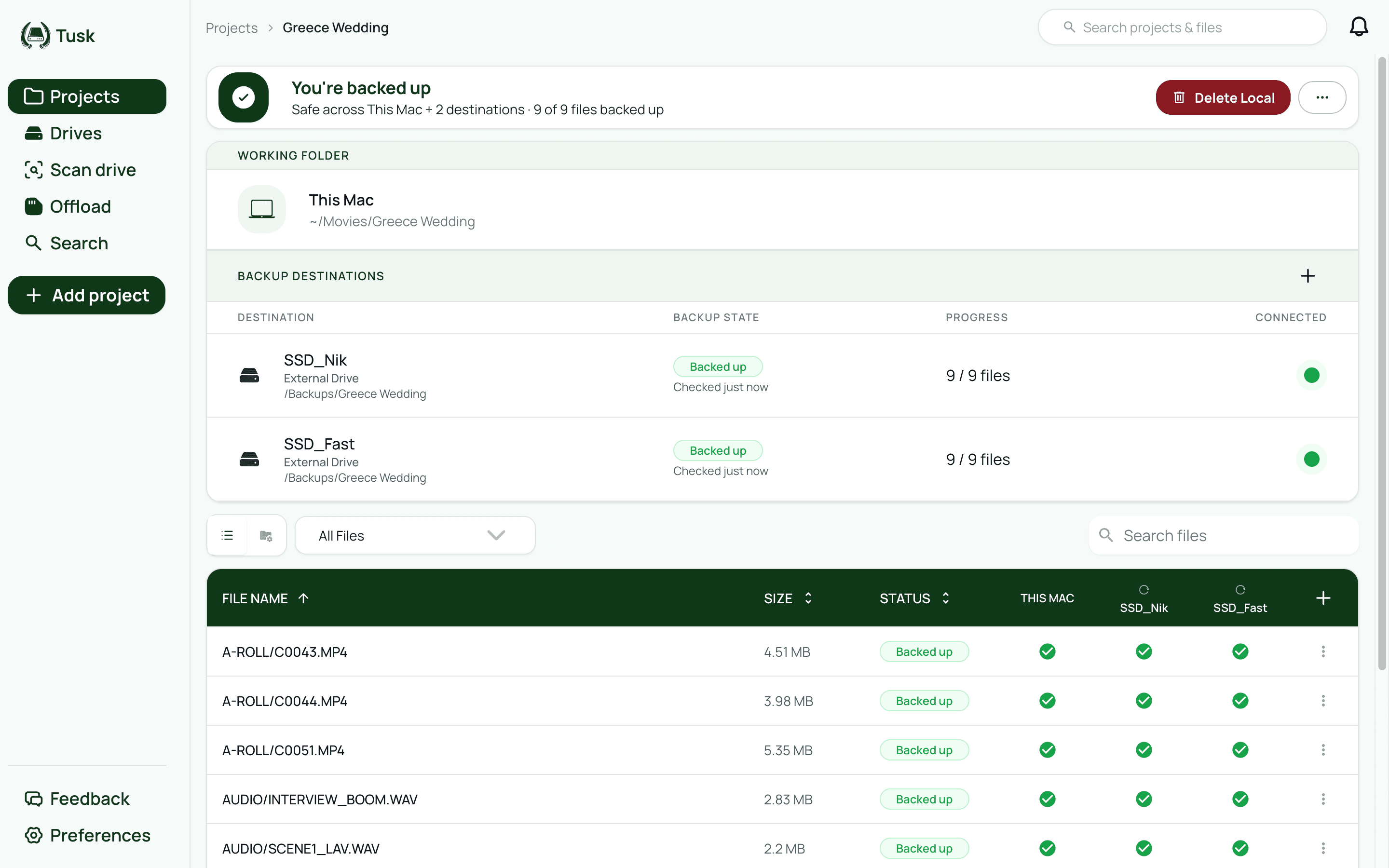
Tusk
Projects / Greece Wedding
~/Movies/Greece Wedding
You're backed up
Safe across This Mac + 2 destinations · 8 of 8 files backed up
Working folder
Greece Wedding
Macintosh HD
Backup destinations
SSD_Nik
1 TB Samsung T7
SSD_Fast
500 GB
| Name | This Mac | SSD_Nik | SSD_Fast | Size | Status |
|---|---|---|---|---|---|
| A-ROLL/C0043.MP4 | 4.12 GB | Backed up | |||
| A-ROLL/C0044.MP4 | 3.88 GB | Backed up | |||
| A-ROLL/C0051.MP4 | 5.02 GB | Backed up | |||
| DRONE/DJI_0042.MP4 | 2.41 GB | Backed up | |||
| AUDIO/INTERVIEW_BOOM.WAV | 412 MB | Backed up | |||
| A-ROLL/C0052.MP4 | 3.21 GB | Backed up | |||
| A-ROLL/C0053.MP4 | 2.77 GB | Backed up | |||
| DRONE/DJI_0048.MP4 | 1.96 GB | Backed up |
New Files
Greece Wedding
Point Tusk at a drive you already filled. It fingerprints every file and builds a project without moving or recopying anything. Then it finds the copies scattered across your Mac and gathers them into one project folder, freeing the space the duplicates took.
Tusk
Track an existing drive
Connected drives
Nothing is moved or written during the scan.
Tusk
Traditional backup tools
Tusk runs on your Mac and collects none of your data. No account, no tracking, no copies on our servers. Files move straight to your drives, or to cloud accounts you connect yourself.
Tusk watches your project folder and carries every change forward to your backups automatically.
Every workflow is different.
See guides for your setup →Time Machine backs up your whole Mac on a schedule but doesn't track individual files across external drives, and it can't tell you whether a specific file is safely backed up before you delete it locally. Backblaze runs continuously in the background but gives you no per-file visibility — you can't see which destination has a confirmed copy of a specific project file. ChronoSync syncs folders on a schedule but has no awareness of what's on a drive when it's disconnected. Tusk is purpose-built for project files. It tracks backup status per file, per destination, in real time — including destinations that are currently unplugged. Before you delete anything locally, Tusk physically verifies each file on every connected backup destination using a BLAKE3 checksum. When drives are disconnected, you can still see exactly where every file lives without plugging anything in.
One-time purchase — you pay once and own it with no monthly fees. The first 100 licenses are $49, with live remaining availability shown on the pricing page; the regular price afterward is $79. The license includes one year of updates. After the first year, updates are optional: Tusk keeps working without them, and you choose whether to renew. You can try Tusk free for 14 days with no credit card and no account required. If you decide it's not for you, just delete the app. Your backup files stay exactly where they are — Tusk stores everything in standard formats on your own drives and cloud accounts.
Yes. Once you set up a project and point it at your footage folder, Tusk watches that folder continuously and syncs every change automatically — new files, re-exports, autosaved project files, renamed clips. No manual triggers, no scheduled runs, no remembering to press sync. You just work. If you quit Tusk and reopen it, it picks up exactly where it left off, including any changes made while it wasn't running. If a backup drive was disconnected while changes accumulated, Tusk syncs those files automatically as soon as the drive reconnects. The whole system is designed around the assumption that you shouldn't have to think about it.
Tusk supports external drives (SSDs, HDDs, and SD cards mounted as volumes), Google Drive and Dropbox (both with multiple accounts in the same project), and Amazon S3-compatible object storage, including Backblaze B2, Wasabi, and AWS S3. You can connect multiple destinations to the same project and Tusk syncs to all of them in parallel. Every file transfer is verified with a BLAKE3 checksum before the source is considered safe.
Yes. Offload has its own place in the sidebar: point it at a card, pick your destinations, and Tusk streams every file to all of them in a single read. The card is read exactly once no matter how many destinations you write to, and a BLAKE3 checksum is computed during the stream, so every copy is verified without a second pass. Keeping a local copy on your Mac is optional. Skip it and the files show up as Remote only while your internal drive stays untouched. When the offload finishes, you can export a transfer report as PDF or CSV with file names, sizes, and checksums per destination. If you shoot for clients or work as a DIT, that report is your delivery receipt.
Your files are always just files — stored on your drives and cloud accounts in their original format with their original filenames. Tusk doesn't wrap anything in a proprietary container, doesn't compress or encrypt without your knowledge, and doesn't require itself to be running for your backups to be accessible. If you stop using Tusk, open your backup drive in Finder and everything is exactly where you'd expect it. You can browse, copy, or restore files manually without Tusk installed. The only thing you lose is the tracking layer — the per-file status visibility and the ability to restore with one click. The files themselves are always yours.
Yes — this is one of the core things Tusk was built for. Every file's location is indexed in a local database on your Mac. You can see that a footage file lives on the drive labeled SSD_Archive and has a verified copy in your Backblaze B2 bucket, even when neither destination is currently plugged in or online. This means you can answer the question 'which drive do I need to grab for the January shoot?' without connecting anything. When you're ready to restore, connect the drive or pull from the cloud and Tusk handles the transfer with the same checksum verification used during the original backup.
No. Tusk runs entirely on your Mac. Your catalog, checksums, and settings live in a local database on your machine, and files travel straight from your Mac to your destinations. There is no Tusk server in the middle, no account, and no usage tracking. The only time your files leave your Mac is when they go to a cloud provider you connected yourself, like your Google Drive, Dropbox, or S3 bucket.
Yes. Choose Track an existing drive, connect the drive, and select the folders you want tracked. Tusk hashes every file already on the drive with a BLAKE3 checksum and creates a verified project for each folder without moving or reorganizing anything on the drive itself. From then on it behaves like any other Tusk project: visible, verified, and trackable even when the drive is unplugged. Each project holds up to 100,000 files; a drive with more than that split across several folders becomes several projects, since there's no limit on how many projects you create.
Tusk blocks the deletion. Before allowing any local file removal, it runs a preflight check that physically verifies each file is present and confirmed on every connected backup destination — not just logged as synced, but actually found on the drive with a matching checksum. If a file hasn't made it to all destinations, or if a destination drive isn't currently connected, the deletion is blocked and Tusk tells you exactly what's missing. Files you delete through Tusk go to the macOS Trash, not permanent deletion, so there's a recovery window even if something unexpected happens. Your backup destinations are always additive — Tusk never removes files from a backup even if you delete them locally.
Tusk syncs in the background and throttles automatically when your Mac is under load so it doesn't compete with Premiere, Resolve, or Lightroom during active sessions. It runs as a menu bar app with no persistent window. Background sync jobs pause automatically during an SD card offload so the transfer gets full bandwidth, then resume when the offload completes. Most photographers and video editors run Tusk continuously without noticing it. If you ever need to push through a large sync quickly, you can also trigger a manual sync from the project view and monitor progress in real time.
Try Tusk free for 14 days. No signup, no credit card.
You keep full control over your files.
No subscription. The license includes a year of updates, and Tusk keeps working after that either way.
Free trial
14 days free trial
All features included
No credit card required
No signup required
Tusk
First 100 licenses · $30 off
one-time
Pay once, own it forever
One year of free updates included
See backup status per file — even when drives are unplugged
Automatically syncs every file change in the background
Free up local space confidently
Restore any file with one click from any destination
Offload SD cards to every destination in one pass
External drives, Google Drive, Dropbox, and S3 supported
Already have a license? Enter your key in Tusk → Preferences → License.
One-time purchase
14-day free trial
Signed & notarized
